

Quick Start
Follow the steps below to quickly set up and start using Interlace APIs.
Welcome to the Interlace API Documentation. Interlace provides APIs for card issuing, banking accounts, crypto infrastructure, payment acquiring, and embedded financial services.
This Quick Start guide will help you set up your environment, obtain API credentials, generate access tokens, and begin integrating with Interlace APIs.
Step 1 — Create Your Account
Sign up and complete KYC through the Interlace portal:
- Sandbox: staging.interlace.money
- Production: www.interlace.money
After your account is approved, sign in to the portal for your integration mode:
-
Sandbox
-
MOR Mode: staging.interlace.money
-
Gateway & Distributor Mode: staging-distributor.interlace.money
-
-
Production
- MOR Mode: www.interlace.money
- Gateway & Distributor Mode: distributor.interlace.money
Step 2 — Get API Keys
- Sandbox: After your Technical Support Engineer enables API access, you can get your
clientIdandclientSecretfrom Merchant Portal → Development Settings.
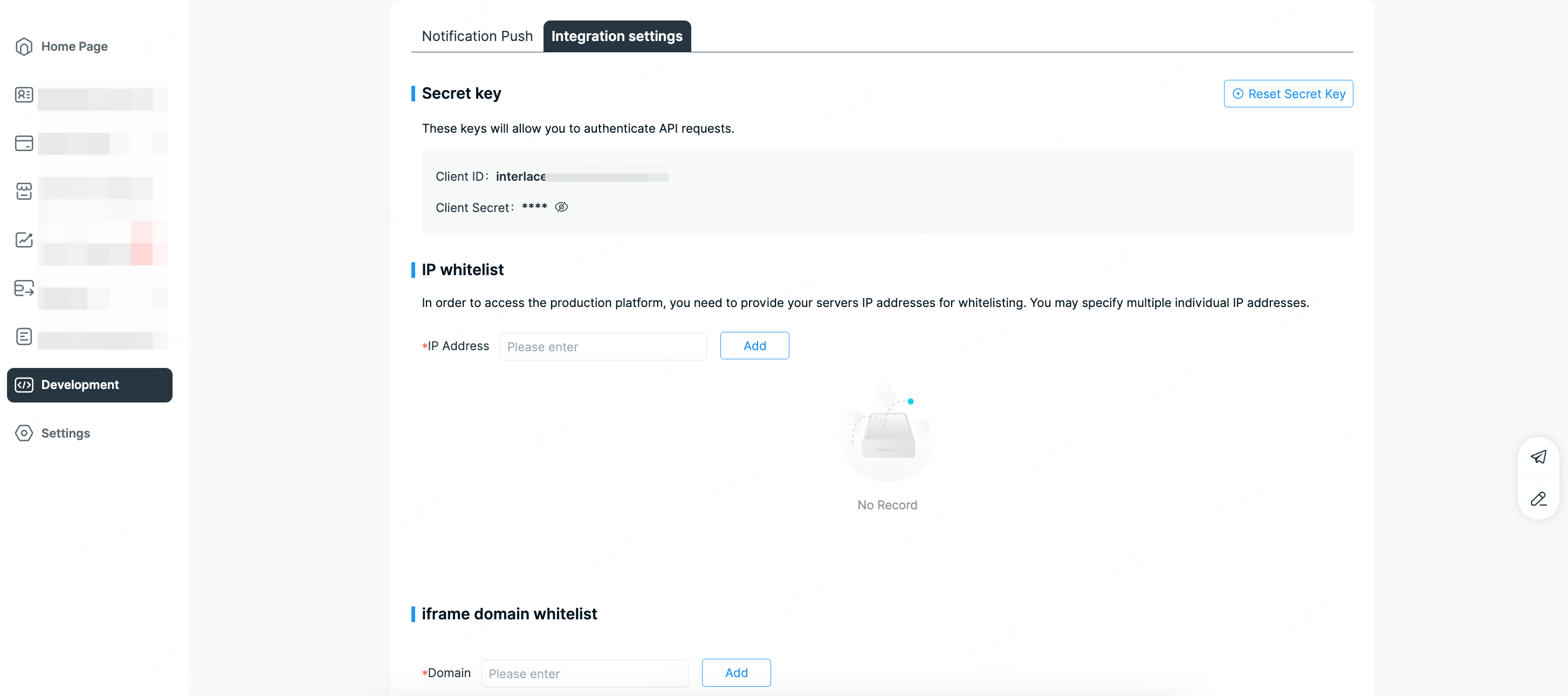
- Production: API access requires internal approval.
- Please first confirm with your Account Manager.
- Once the approval workflow is completed, your Account Manager will coordinate with the Technical Support Engineer to enable API access.
- Your
clientIdandclientSecretwill be sent to your registered email and can also be found in Merchant Portal → Development Settings.
- Security Recommendation: We recommend regularly resetting your API keys and updating the corresponding configurations in your system to maintain API security.
-
Additional settings:
-
Merchant Server IP Whitelist (Required): Ensure that your server's outbound IP addresses are added to the IP whitelist. API requests will be blocked if the IP whitelist is not configured.
-
Interlace Server IPs: Please whitelist the following Interlace server IP addresses to ensure stable API communication.
Production Environment
- 47.88.34.101
- 47.88.103.100
- 47.88.61.14
- 47.89.250.82
- 47.89.240.147
- 47.88.57.67
Sandbox Environment
- 120.25.101.116
- 47.254.89.98
- 47.89.240.147
-
Webhook URL: Optional in both environments. (HTTP allowed in sandbox, HTTPS required in production.)
-
Step 3 — API Environments
Interlace provides both sandbox and production environments for API integration and testing. The sandbox environment allows you to safely test your integration without generating actual financial transactions.
- Sandbox: https://api-sandbox.interlace.money
- Production: https://api.interlace.money
Step 4 — Generate Access Token
1. What is an Access Token?
An Access Token is a unique credential that authorizes your application to call Interlace APIs. It grants access to privileged operations and must be kept confidential at all times.
-
All API requests must include a valid access token in the request header.
-
Requests without authentication will be rejected.
-
All requests must be made over HTTPS.
-
Access tokens are typically valid for 24 hours. You can reuse the same token until it expires.
-
Only one access token per
clientIdcan be valid at a time. Generating a new token or refreshing an existing one will immediately invalidate the previous token. -
Avoid requesting or refreshing access tokens unnecessarily. Reuse the existing valid token instead of requesting a new one for each API call.
2. How to obtain an Access Token?
This process involves two steps:
-
Get Code
- Call the "Get a code" API with your
clientId. - An authorization code will be returned upon success.
- Call the "Get a code" API with your
-
Request Access Token
- Call the "Generate an access token" API with your
clientIdandcode. - An
accessTokenwill be returned upon success. - When Strict Access Token Mode is enabled, requests to generate or refresh an access token must include the following HTTP headers:
X-TimestampandX-Signature. For instructions on generating the signature, see API Signature Authentication.
- Call the "Generate an access token" API with your
3. Example Authentication Flow
- Get Code
# Replace ${CLIENT_ID} with your client id
curl -H 'Accept: application/json' \
  -X GET --url https://api-sandbox.interlace.money/open-api/v3/oauth/authorize?clientId=${CLIENT_ID}
💡 Successful Response
{
    "code": "000000",
    "message": "success",
    "data": {
        "timestamp": 1758169263,
        "code": "8655cf76c744615b57e631216ee006df"
    }
}- Request Access Token
# Replace the placeholders with your actual credentials and signature values

curl -H 'Accept: application/json' \
  -H 'Content-Type: application/json' \
  -H 'X-Signature: X_SIGNATURE' \
  -H 'X-Timestamp: X_TIMESTAMP' \
  -X POST --url https://api-sandbox.interlace.money/open-api/v3/oauth/access-token \
  --data '{
    "clientId": "CLIENT_ID",
    "code": "AUTH_CODE"
  }'
💡 Successful Response
{
    "code": "000000",
    "message": "success",
    "data": {
        "accessToken": "808d7d5e8a310848ab0f3cfd49d6e428509a63e9",
        "refreshToken": "78ce95427a0d0b6e5539fe230f0fb9538a964597f10012fa714d52b642fca294",
        "expiresIn": 86400,
        "timestamp": 1757994759
    }
}
Next Steps
After completing the basic authentication setup, you can continue with the integration guide that matches your business scenario.
Acquiring & Payment Processing (AaaS)
Use the Acquiring APIs to process card payments, integrate 3DS authentication, and manage payment flows.
View Acquiring Integration Guide
Agent Card
Use Agent Card APIs and MCP tools to issue AI agent cards, manage top-ups, and retrieve card details.
Business Accounts & Transfers (BaaS and Payout)
Use the BaaS APIs to onboard entities, create busines accounts, manage balances, and initiate fund transfers.
Card Issuing (CaaS)
Use the CaaS APIs to create cardholders, issue virtual or physical cards and manage spending controls.
Crypto Wallet & Stablecoin Services (WaaS)
Use the WaaS APIs to manage wallets, handle stablecoin transfers, and integrate crypto-related capabilities.
Scan to Pay
Use the Scan to Pay APIs to onboard customers, create payment orders, and track payment status.
View Scan to Pay Integration Guide
Updated 5 days ago