

CaaS Overview
This guide provides a starting point for integrating Interlace Card-as-a-Service (CaaS).
Before implementation begins, determine the appropriate integration configuration and understand the workflow that applies to your business model.
Choose Your Integration Path
This section outlines the key configuration decisions required before integration begins. Each decision affects compliance responsibilities, operational workflows, and system behaviour.
1. Determine Your Operating Mode: MoR or Gateway
The primary distinction between MoR (Merchant of Record) and Gateway modes lies in how compliance responsibilities and client funds are managed.
- MoR mode is intended for licensed entities that manage compliance obligations and hold or control downstream client funds.
- Gateway mode is designed for platforms that are unlicensed or prefer not to manage client funds directly.
Refer to Integration Modes Overview for detailed guidance on selecting the appropriate operating mode.
2. Confirm the Card Usage Type: Business Use or Consumer Use
After selecting the operating mode, determine whether cards will be used for business operations or issued to individual consumers.
Business Use
Business Use covers cards issued for operational spending or for resale to other businesses. Typical scenarios include:
- General business spending (e.g., media buying, logistics, OTA, procurement)
- B2B reseller programs (reselling cards to other businesses)
- Employee or payroll-related card programs
Consumer Use
Consumer Use covers cards issued to individual end users. Typical scenarios include:
- B2C reseller programs (reselling cards to individuals)
3. Select the Cardholder Tier
When creating a cardholder, a cardholder tier must be specified. The selected tier determines identity verification requirements, transaction controls, and card issuance limits.
| Cardholder Tier | Use Case | KYC | MCC Policy | Card Limit |
|---|---|---|---|---|
| CORPORATE_MANAGED | Business use: ad spend, SaaS, travel, procurement, logistics, etc. | KYB (corporate-level) | Strict – declared MCC categories only | 20 (unlimited for Media Buy) |
| NAMED_INDIVIDUAL | Business use: cards for named employees, contractors, or clients | Full KYC (identity verified) | Per compliance configuration | 5 |
| CONSUMER | Consumer use: cards issued to end consumers | Full KYC | Per compliance configuration | 5 |
Card limits
CORPORATE_MANAGEDtier (Media Buy): No per-cardholder limit.CORPORATE_MANAGEDtier (non-Media Buy): A maximum of 20 cards per cardholder. The limit includes active and frozen cards, both physical and virtual. Deleting a card releases the available slot.NAMED_INDIVIDUALandCONSUMERtiers: A maximum of 5 cards per cardholder. The limit includes active and frozen cards, both physical and virtual. Deleting a card releases the available slot.
Quick Way to Decide Your Integration Path
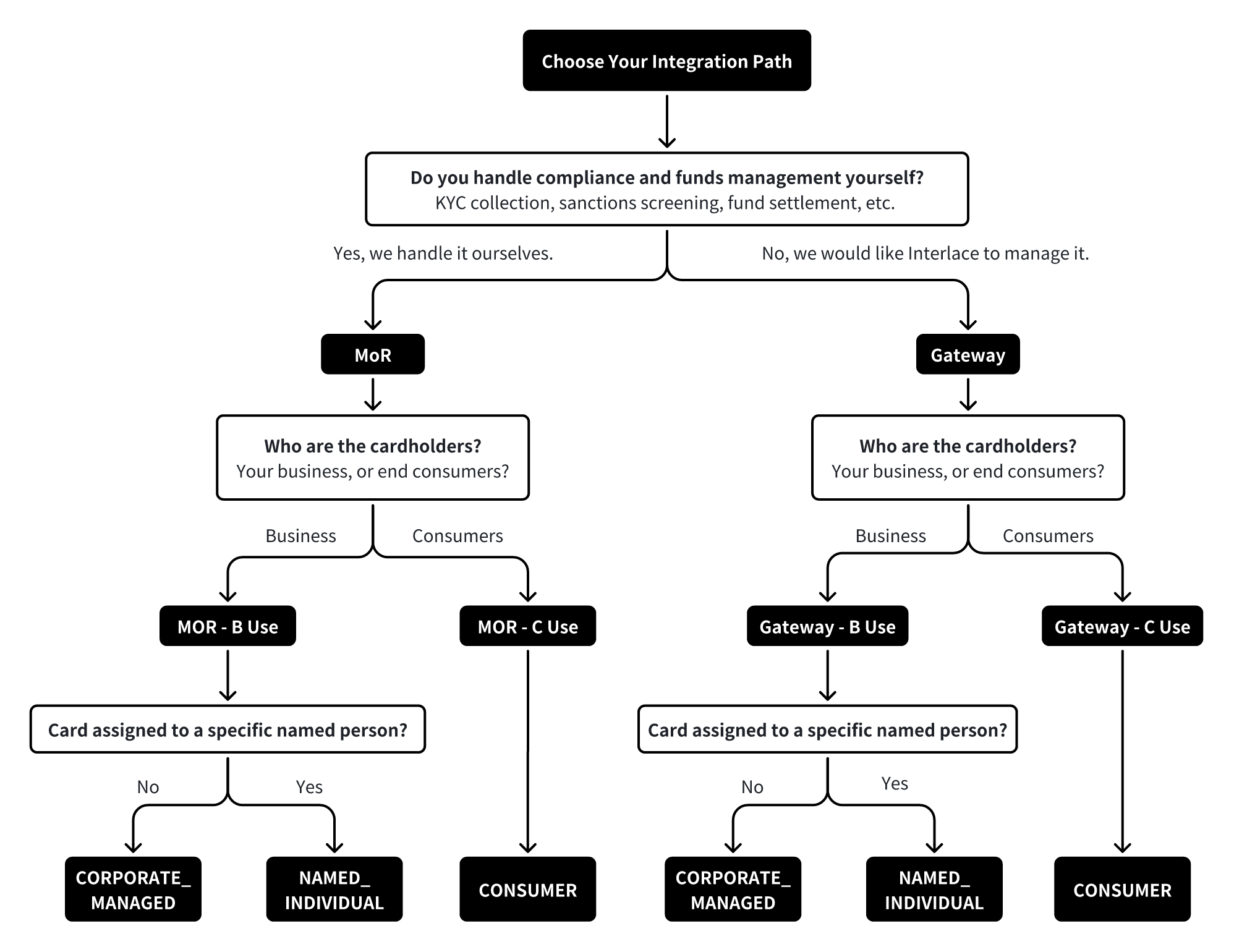
Integration Tutorials by Mode
After determining the integration configuration, follow the tutorial that corresponds to your selected operating mode and usage type. Each tutorial provides the complete workflow, including required steps, API dependencies, and validation rules.
KYC Management Model
Interlace supports two KYC management models for cardholder verification: Standard KYC and Partner Managed KYC.
1. Standard KYC
Under the standard KYC model, Interlace manages the cardholder verification process. Partners are required to provide the required cardholder information, and eligible cardholders will complete identity verification through Interlace's KYC verification process.
The standard KYC process applies to all partners by default.
2. Partner Managed KYC
Partner Managed KYC enables partners with an established KYC and compliance process to integrate their existing compliance workflow with Interlace's card issuance process.
Partners may apply to use Partner Managed KYC. The feature will be enabled after review and approval by Interlace Compliance.
Prerequisites
- Approval from Interlace Compliance.
- An established customer onboarding and KYC compliance process.
- Submission of the required cardholder information in accordance with Interlace's data requirements.
- Interlace retains final approval authority for cardholder onboarding and card issuance, and may require additional verification or supporting documentation where necessary.
Availability
- Partner Managed KYC is only available for MoR mode and Distributor partners operating under the MoR mode.
With Managed KYC enabled:
- Cardholder creation does not require an additional Interlace-hosted identity verification step.
- Partners must provide the complete set of required cardholder information based on the selected cardholder tier.
- Physical card activation continues to require identity verification for applicable workflows.
- For implementation details, refer to the integration guides for your business model and card issuance workflow.
References
This section provides supporting technical and compliance information used across multiple workflows.
Create KYB Profile API
The Create KYB Profile endpoint is used to submit company and Ultimate Beneficial Owner (UBO) information. Upon success submission, the API returns a unique profileId and a review status. Note this endpoint is only applicable to MOR-Business Use clients.
- Endpoint: Submit account KYB
Merchant Category Codes (MCC)
This reference defines the complete set of Business Use Merchant Category Codes (MCCs) and their related scenarios. It helps clarify how business transactions are classified and how MCC-based controls or restrictions may apply to specific use cases. For the full list of Business Use MCC codes and descriptions, see MCC Code Reference.
Updated 3 months ago