

Wallet-Linked Funding
Overview
Wallet-Linked Funding is a funding model that allows prepaid cards and budgets to be funded directly from an Interlace crypto wallet.
In the standard funding model, funds must first be transferred from an Interlace crypto wallet into Infinity Account before they can be used to fund prepaid cards or budgets. Customers are responsible for managing these transfers and ensuring that sufficient funds are available before card spending occurs.
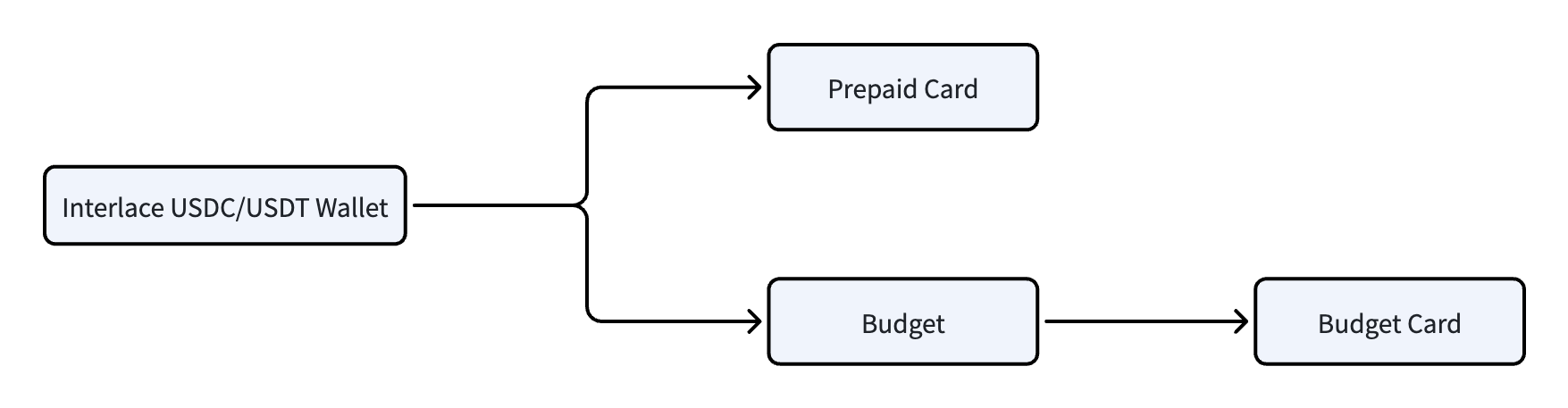
With Wallet-Linked Funding, this additional funding step is removed. Instead, an Interlace crypto wallet can be linked directly to a prepaid card or budget. Once linked, card transactions are funded automatically from the selected wallet.
This funding model simplifies the integration flow and reduces the number of APIs required to support card funding.
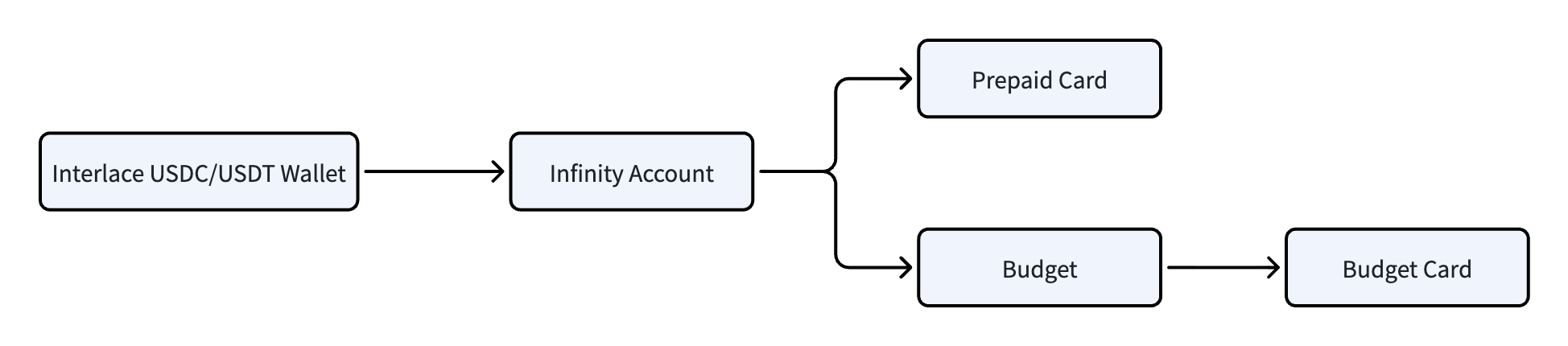
Standard Funding
Under the standard funding model, funds are transferred from an Interlace crypto wallet into Infinity Account before they can be used for card spending. This model provides explicit control over how funds are allocated, but requires an additional funding step before cards can be used.
Wallet-Linked Funding
Wallet-Linked Funding allows prepaid cards and budgets to spend directly from a linked USDC or USDT wallet without requiring funds to be transferred into an Infinity Account first. A linked wallet can be used to fund prepaid card transactions directly, or to fund a budget and all budget cards issued under that budget.
When a transaction is initiated, the available balance of the linked wallet is verified during authorization. Transactions are approved only when sufficient funds are available.
Currently, USDC and USDT wallets are supported.
Example Transaction Flow
[1] Card Transaction Initiated
        ↓
[2] Verify Card Status and Available Wallet Balance
        ↓
[3] Approve or Decline Transaction
        ↓
[4] If Approved, Fund Transaction from the Linked Wallet (USDC/USDT)
        ↓
[5] Return Transaction Result
Workflow
Step 1 — Create a Card
1. Prepaid Card
Use the Create Prepaid Card API to create a single prepaid card, or use the Batch Create Prepaid Card API to create multiple prepaid cards in bulk.
- Endpoint: Create Prepaid Card, Batch Create Prepaid Card
2. Budget Card
To create a budget card, you must first set up a budget, and then create cards under that budget.
2.1 Create a Budget
- Endpoint: Create a budget
2.2 Create a Budget Card
Use the Create Budget Card API to create a single budget card, or use the Batch Create Budget Card API to create multiple budget cards in bulk.
- Endpoint: Create Budget Card, Batch Create Budget Card
Step 2 — Retrieve the Balance Object ID
Call the List Balance Objects API to retrieve the balance object ID associated with the prepaid card or budget. The returned balance object ID is required when linking a wallet.
- Endpoint: List Balance Objects
Step 3 — Retrieve the Wallet ID
Call the List All Wallets API to retrieve the ID of the USDC or USDT wallet that will be used as the funding source.
- Endpoint: List All Wallets
Step 4 — Link a Wallet
Call the Bind Wallet API. Once the request is successful, the selected wallet becomes the funding source for the associated prepaid card or budget.
- Endpoint: Bind Wallet
- Required Parameters:
walletId: The ID of the USDC or USDT wallet retrieved in Step 3.balanceId: The balance object ID retrieved in Step 2.
Step 5 — Start Spending
Once a wallet has been linked, card transactions are funded directly from the linked wallet.
Important:
- The available balance of the linked wallet is verified during authorization. Transactions are approved only when sufficient funds are available. If the linked wallet does not have sufficient funds, the transaction is declined.
- When a wallet is linked to a budget, all budget cards issued under that budget draw funds from the linked wallet. The available spending capacity is determined by the available balance of the linked wallet. If spending controls are required, transaction limits can be configured using Velocity Control API. For more information, see the Velocity Control Guide.
Updated 3 months ago