

Make a Payment
This section explains how to initiate and complete payments through the Interlace platform.
1. Payment Flow Types
Interlace supports two payment flow types: Direct and Redirect. Each flow has different operational and compliance considerations.
| Type | Definition | Characteristics |
|---|---|---|
| Direct | The customer completes the payment directly on the merchant's website. | Payment data is collected within the merchant environment. This flow requires secure handling of sensitive payment data and compliance with PCI DSS requirements. |
| Redirect | The customer is redirected to an Interlace-hosted page or a third-party payment provider's website to complete the transaction. | Sensitive payment data is collected and processed by Interlace or the provider, reducing the merchant's PCI compliance scope. |
2. Card Payments
Credit and debit cards are widely used payment methods that allow customers to complete transactions using funds from their bank account or available credit.
Capabilities
- Supports major card brands, including Visa, Mastercard, and American Express
- Supports one-time payments and recurring payments
- Supports 3D Secure (3DS) authentication
- Supports both Direct and Redirect payment flows
2.1 Card Payment Methods
Interlace supports multiple methods for initiating card payments, depending on your integration setup and PCI compliance level. Using the Interlace API, merchants can build their own payment forms and maintain full control over the checkout experience, including layout, styling, and workflow.
| Integration Method | Description |
|---|---|
| Pay with Card Data | Available only for merchants that are fully PCI DSS compliant and capable of securely collecting and transmitting card data within their own environment. |
| Pay via Iframe | Recommended for merchants that are not fully PCI DSS compliant. Card data is securely collected through an embedded iframe provided by Interlace. |
| Pay via Checkout | Suitable for merchants without PCI DSS compliance. Customers are redirected to an Interlace-hosted payment page where all sensitive payment data is handled by Interlace. |
Pay with Card Data
This method allows merchants to collect card data directly within their own payment form and submit the payment request through the Interlace API. It is available only to merchants that are fully PCI DSS compliant. For request and response examples, see the Acquiring API Resources section.
Pay via Iframe
This method allows merchants to collect card data securely using an embedded iframe provided by Interlace. The iframe handles sensitive payment fields, helping merchants meet PCI security requirements while keeping customers on the merchant's website. For request and response examples, see the Acquiring API Resources section.
Pay via Checkout
This method redirects customers to an Interlace-hosted payment page to complete the transaction. Interlace handles the collection and processing of sensitive payment data, reducing the merchant's PCI compliance requirements. For request and response examples, see the Acquiring API Resources section.
2.2 Authorization and Capture
Authorization and capture define how funds are reserved and collected during a payment transaction.
How It Works
A typical card payment involves two steps: authorization and capture.
- During authorization, the issuing bank verifies the transaction and reserves the required amount on the customer's card.
- During capture, the reserved funds are collected and transferred for settlement.
Currently, only automatic capture is supported. Once an authorization request is successfully initiated, the system automatically completes the capture step.
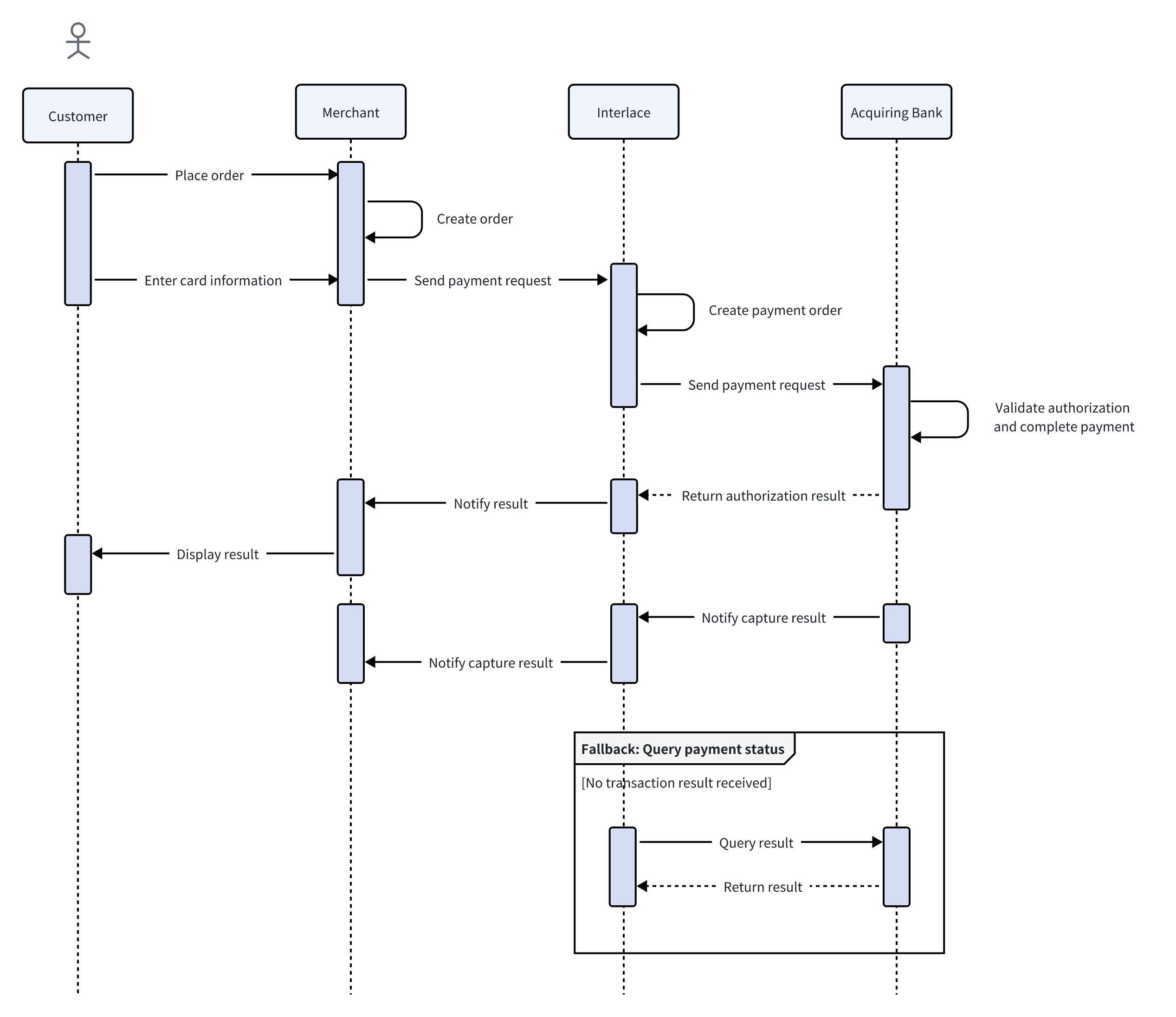
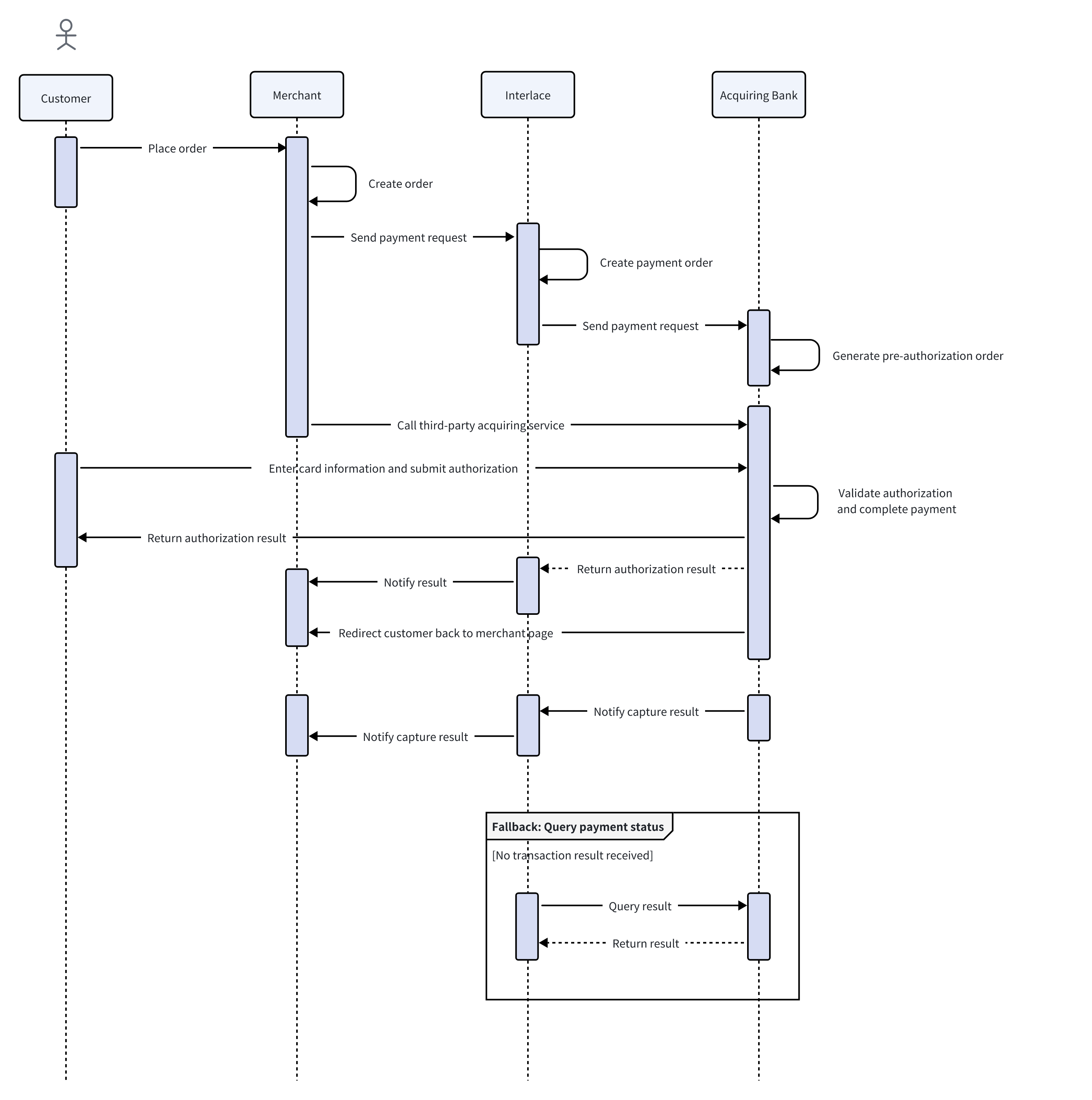
The following diagrams illustrate the authorization and capture flow under different payment flow types.
Direct Mode
Redirect Mode
2.3 3D Secure (3DS)
This section explains how 3D Secure (3DS) authentication works and its role in preventing fraud and enhancing transaction security.
What is 3D Secure (3DS)?
3D Secure (3DS) is a security authentication protocol designed to add an additional layer of protection to card-not-present transactions and help prevent fraud.
During the payment process, the issuing bank evaluates the transaction using information such as cardholder data, device details, and historical transaction patterns.
If the issuer cannot confidently verify the cardholder's identity, the customer may be redirected to an authentication page to complete additional verification. This may include entering a one-time password (OTP) received via SMS, using biometric authentication, or completing another verification method.
Liability Shift
A key aspect of 3DS authentication is liability shift. When a transaction is successfully authenticated through 3DS, the liability for certain types of chargebacks may shift from the merchant to the issuing bank, subject to applicable card network rules.
How It Works
The 3DS authentication process involves several dedicated systems that work together to verify the cardholder's identity. The key components in the 3DS workflow include:
- 3DS Server
The 3DS Server initiates the authentication process by collecting transaction and cardholder information. It acts as the entry point to the 3DS workflow.
- Directory Server
The Directory Server routes the authentication request to the corresponding issuing bank by identifying the card issuer. It also performs mutual authentication with the 3DS Server to ensure secure communication.
- Access Control Server (ACS)
The Access Control Server is operated by the issuing bank and is responsible for verifying the cardholder's identity. Based on the issuer's risk assessment, the ACS determines whether additional authentication is required.
The authentication outcome depends on the result of the issuer's risk assessment.
- If the transaction is assessed as low risk, authentication may be completed without additional user interaction.
- If additional verification is required, the customer is prompted to complete an authentication challenge, such as entering an OTP or using biometric verification.
- If authentication succeeds, the transaction proceeds.
- If authentication fails, the transaction is declined to prevent potential fraud.
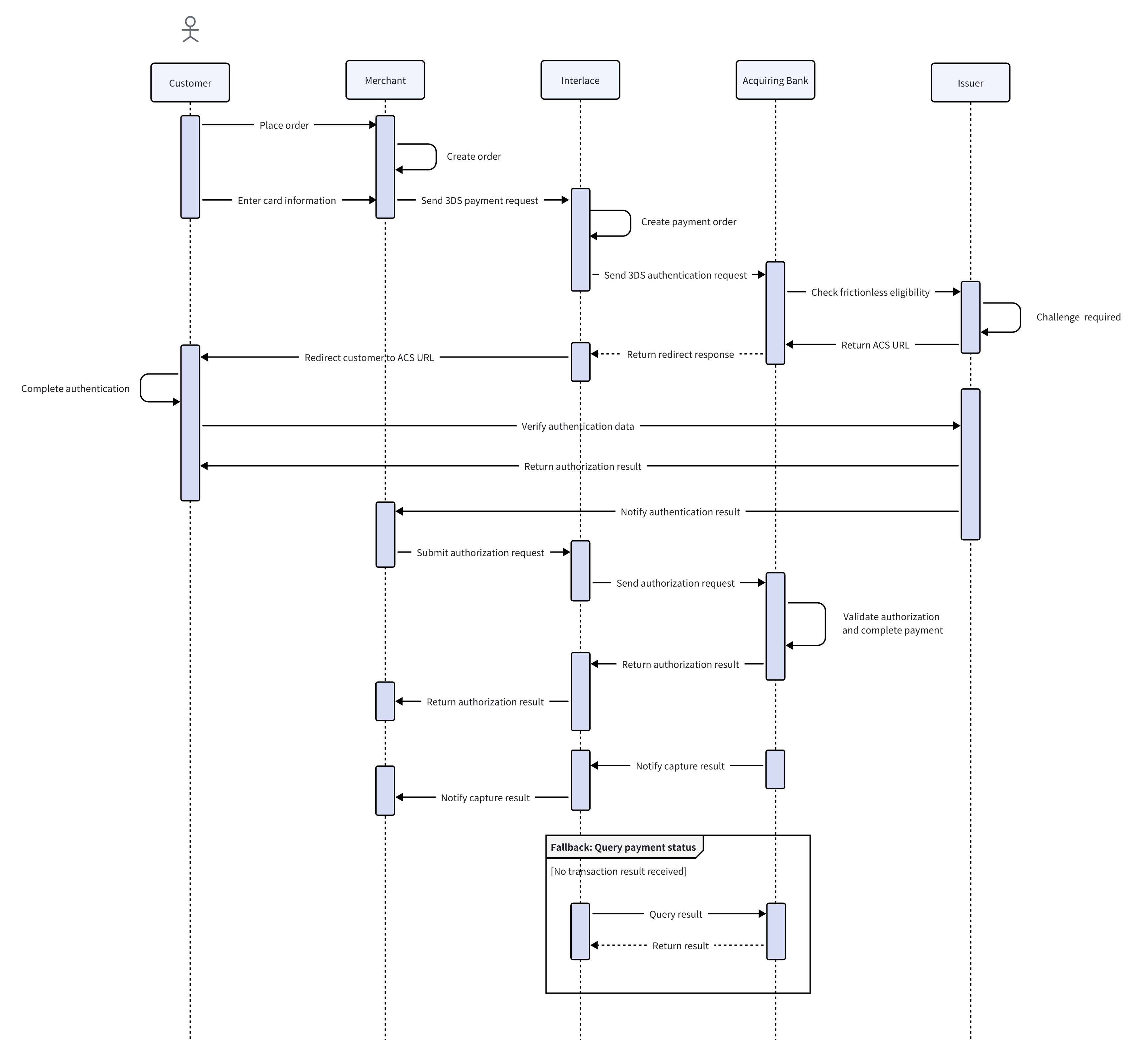
The following diagram illustrates the 3DS authentication flow.
Updated 6 months ago