

Scan to Pay Overview
This guide provides an overview of the Scan to Pay integration, covering supported markets, prerequisites, integration flow, API capabilities, business rules, display requirements, and payment order lifecycle and status tracking. It is intended to support partners throughout integration, testing, production launch, and compliance review.
Overview
Scan to Pay enables customers to pay local merchants by scanning supported QR payment codes. The payment amount is settled to the merchant in local fiat currency, while the corresponding stablecoin amount is deducted from the partner's Interlace account balance.
Scan to Pay can be used for both in-store and online QR code payments.
Note: Scan to Pay is currently available to Merchant of Record (MoR) partners only. For more details about MoR modes, please refer to Integration Mode Overview.
Supported Countries and Currencies
Scan to Pay currently supports the following countries and local currencies. Payment orders cannot be created for countries that are not supported.
Asia
- Vietnam (VND)
- Philippines (PHP)
Africa
- Kenya (KES)
- Tanzania (TZS)
- Uganda (UGX)
- South Africa (ZAR)
- Nigeria (NGN)
- Ghana (GHS)
- Zambia (ZMW)
Latin America
- Brazil (BRL)
- Argentina (ARS)
- Colombia (COP)
- Peru (PEN)
- Bolivia (BOB)
- Paraguay (PYG)
How It Works
The following diagram illustrates the end-to-end Scan to Pay payment flow.
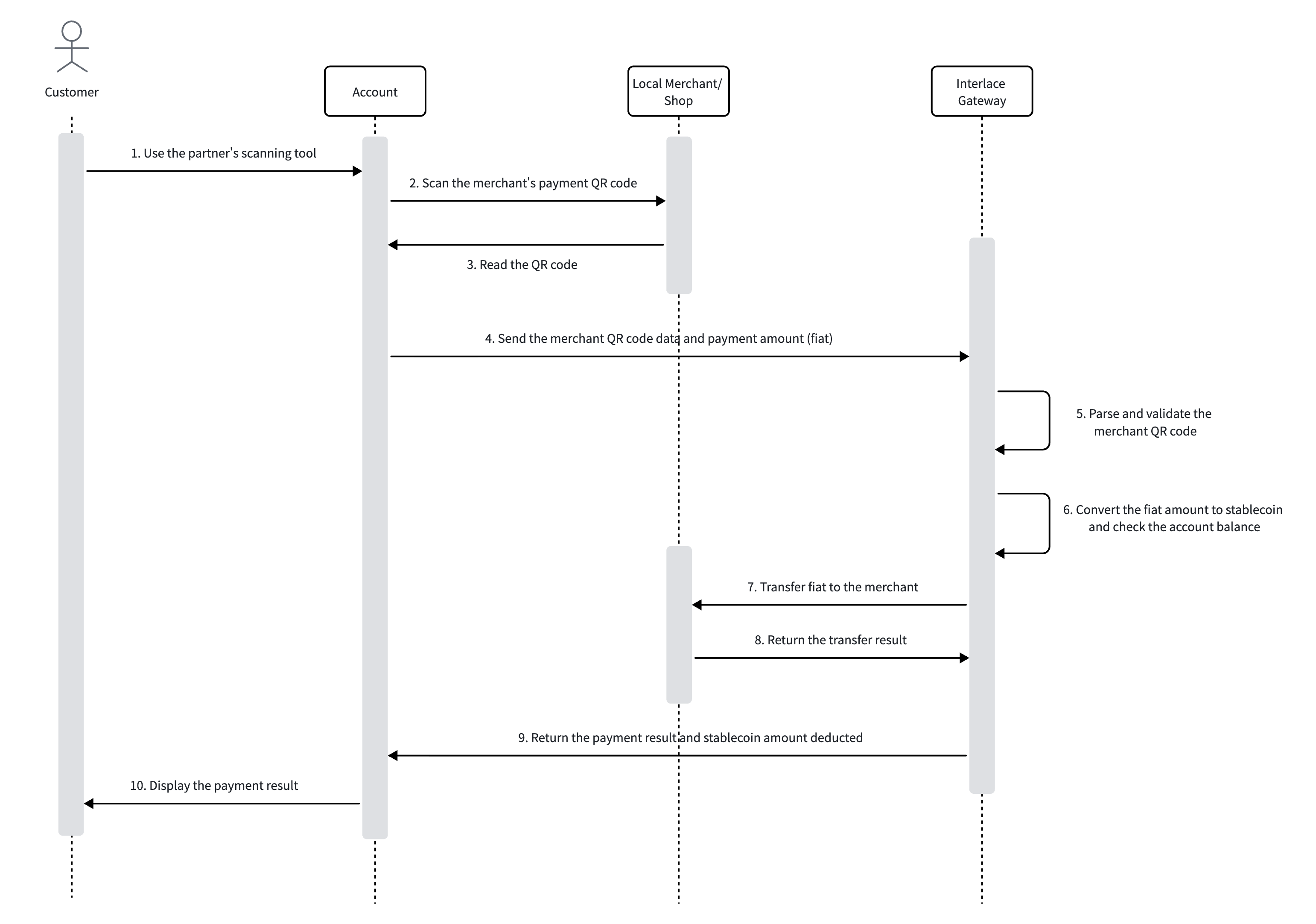
A typical Scan to Pay transaction follows this flow:
- The customer scans a merchant's QR payment code.
- Partner's system submits the QR code information and payment details to Interlace.
- Interlace validates the payment information and calculates the corresponding stablecoin amount.
- The stablecoin amount is deducted from the partner's Interlace account balance.
- Interlace sends the fiat payment to the local merchant.
- The payment order is updated once processing is complete.
Prerequisites
Each customer must be registered before using Scan to Pay. Payments can only be initiated after the required registration and activation process is complete.
1. Customer Registration
- Provide the required customer information and register your customer.
- Specify the countries where the customer will use Scan to Pay, based on the countries enabled for the partner account.
- Track the customer's activation status for each requested country through webhooks or the relevant API.
2. Fund the Account
- Retrieve Interlace deposit address and deposit funds in a supported stablecoin. The stablecoin must be supported under the agreement with Interlace.
- Use the balance API to check current account balance.
For the complete integration flow, see Integrate Scan to Pay.
Updated 2 months ago